Wednesday, March 6, 2013

Au Revoir

Time to make it official... due to time constraints, I can no longer update this blog. However, feel free to visit my personal blog Tech Enthusiast, where I share tidbits from around the web, or follow me on Twitter.

Special thanks to those that contributed to Googly News by participating in a "Third Thursday Interview":
           Katie Siegel, MTV Networks
           Kristen Sosulski, NYU Stern
           Norman White, NYU Stern
           Greg Marsh, Google

Extra thanks to Professor Sosulski, whose class assignment initiated Googly News! :)

Thank you to all that visited, followed, liked, commented, and shared! I leave you with my favorite Google Doodle (honoring Salvador Dali)...


Friday, July 1, 2011

Google in Preliminary Talks To Buy Hulu [REPORT]

Google in Preliminary Talks To Buy Hulu [REPORT]: "Google already owns the most-viewed online video site, YouTube. Now it might be picking up the video site with the most ad views as well.

The company is in preliminary talks to buy television streaming site Hulu, the L.A. Times reports.

According to the newspaper’s sources, Hulu has been meeting with potential buyers that include Google, Microsoft and Yahoo.

Hulu holds the rights to stream popular current TV shows like Glee and Modern Family that make it appealing to advertisers and thus potential buyers. It also launched a subscription service last year that offers extended archives.

Earlier this year, CEO Jason Kilar said that the site is on track to hit $500 million in revenue in 2011 and had 50% more advertisers in the first quarter of 2011 than during same period in 2010.

Hulu was reportedly preparing for a $2 billion IPO last year, but it pulled back due to concerns about its deals with the networks.

Since then, the company has renegotiated deals with some of its licensing partners and expanded its original programming. But some analysts still see the uncertain long-term future of the network relationships — that make the site valuable — as something that could deter a buyer.

“If you had those deals for 10 years, OK, you have time to build a business,” Arash Amel, research director for digital media for IHS Screen Digest, told the L.A. Times. “But look at what they are trying to do to Netflix. They help you until you are successful then they want most of what you make or they try to kill you.”


Wednesday, June 29, 2011

Google Takeout

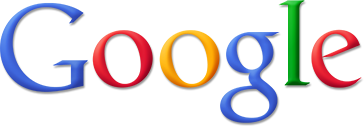
Google Takeout: "Google wants to differentiate from Facebook by offering a lot of ways to export your data. Google Takeout is a feature that's included in Google+, but it's also available as a standalone service. You can use it to export your contacts, Google Buzz messages, Picasa Web photos and Profile data with one click.

'Google Takeout lets you take your data out of multiple Google products in one fell swoop. Moreover, you’ll find that all your data is in portable and open formats‚ so it's easy to import to other services quickly,' mentions the Data Liberation blog.

I've downloaded my data in a huge ZIP archive that included all my Buzz posts saved as HTML files, VCF files for my Gmail groups and the first 100 photos from each of my Picasa Web album. What's the point of downloading the first 100 photos?"

Tuesday, June 28, 2011

What Do You Think of Google+? [POLL]

What Do You Think of Google+? [POLL]: "


Google has unveiled its answer to Facebook: Google+. Will it give the king of social networking a run for its money, or will it fall flat like some of the search giant’s previous attempts at social?
Google+ is both a social layer and a full-fledged social network. Users will find a new navigation bar, complete with new sharing options. It leads to the Google+ homepage, where users can access their friend streams, share and edit multimedia, create group video chats and more."


Thursday, June 16, 2011

Third Thursday Interview: Greg Marsh

June's Third Thursday Interview is with Greg Marsh. Greg is a University Programs Manager with Google, Inc. Keep reading to learn about his thoughts about Google products, what his job entails, and his tips for getting a job with Google!
First word that comes to mind when thinking of Google: Innovative.
First Google product you ever used: Search. I remember when I first heard about Google and all the "cool kids" were using it... Well, never one to follow, I was going to stick to my "Meta-Crawler." Not even sure it still exists... But MetaCrawler billed itself as the searcher of search engines, basically taking all the results of Yahoo, Google (whatever that was), Lycos, and rolling it into one... But soon, the simplicity of Google won me over, and perhaps more importantly, its ability to find you that REALLY obscure webpage no other search engine ever could.
Google products you currently use: Mainly... all of them.
Favorite Google product: Love Street View. I found Street View to be most helpful when my wife and I were relocating from SF to Boston. Everyone has apartment hunted before. Obviously you know there are many sites out there to show you pictures of the apartment, outside and inside, but what's missing is a view of the neighborhood-- what's around you, does it look safe, how does the parking situation look, etc. In comes Street View! So helpful for us to explore our new potential neighborhoods from across the country...
Google product you could live without: That I could live without? Well, Google Buzz consists almost entirely of my Twitter feed...
Google product idea/Favorite Not-So-Googly product: Hmmm, still working on my next big idea for Google, but for now I'll say I love Twitter. Love the ability to for real-time search, and glad that now Google will integrate those results into search. For example, if I hear a bunch of crazy sirens and gun shots going around me in Boston, I can search "gun shots sirens Boston" and find out on Twitter they are currently shooting a Ben Affleck movie in Boston and that it's "only a movie." Also love its ability to make stuff happen. I wait forever for a refund from British Airways with no word-- tweet something nasty about it, and what do you know-- refund comes through... :) Follow me @gmarsh17 by the way... And for student opportunities: @googlestudents (shameless plug).
Message to Googly News' readers: I hope this is helpful and SOMEWHAT interesting. I often tell people I have the greatest job in the world-- and I do. I travel the world talking about a company I love, whose products I love, and try and find the next generation of Googlers to work with people I love... Can it get any better? By the way, we're hiring. So be sure to check out www.google.com/jobs or www.google.com/students if you're job hunting-- and keep checking back-- there's always new things popping up!! After all, this is Google! :)

To keep track of future Third Thursday Interviews and more Googly News, make sure to follow Googly News on Facebook and Twitter.

***Obligatory disclaimer: The views expressed above are Greg Marsh's and not necessarily those of his employer.***


Thursday, June 2, 2011

YouTube Reactions

YouTube Reactions: YouTube tests a new feature that allows users to express their reactions without posting silly comments. They can just click one of the six buttons (LOL, OMG, EPIC, CUTE, WTF, FAIL) and instantly tag the video.
YouTube already highlights tags that use Internet slag words ('#LOL', '#FAIL', '#CUTE') from the comments and places links to a list of comment search results.
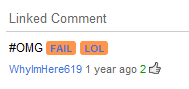
Blogger has a similar feature, but blog authors can edit the list of reactions. 'With Reactions, readers can easily respond with one click, increasing feedback on posts.


Friday, May 27, 2011

Coming soon: make your phone your wallet

Coming soon: make your phone your wallet: "(Cross-posted on the Google Commerce Blog and Google Mobile Blog)

Today in our New York City office, along with Citi, MasterCard, First Data and Sprint, we gave a demo of Google Wallet, an app that will make your phone your wallet. You’ll be able to tap, pay and save using your phone and near field communication (NFC). We’re field testing Google Wallet now and plan to release it soon.

Google Wallet is a key part of our ongoing effort to improve shopping for both businesses and consumers. It’s aimed at making it easier for you to pay for and save on the goods you want, while giving merchants more ways to offer coupons and loyalty programs to customers, as well as bridging the gap between online and offline commerce.

Because Google Wallet is a mobile app, it will do more than a regular wallet ever could. You'll be able to store your credit cards, offers, loyalty cards and gift cards, but without the bulk. When you tap to pay, your phone will also automatically redeem offers and earn loyalty points for you. Someday, even things like boarding passes, tickets, ID and keys could be stored in Google Wallet.


At first, Google Wallet will support both Citi MasterCard and a Google Prepaid Card, which you’ll be able to fund with almost any payment card. From the outset, you’ll be able to tap your phone to pay wherever MasterCard PayPass is accepted. Google Wallet will also sync your Google Offers, which you’ll be able to redeem via NFC at participating SingleTap™ merchants, or by showing the barcode as you check out. Many merchants are working to integrate their offers and loyalty programs with Google Wallet.

With Google Wallet, we’re building an open commerce ecosystem, and we’re planning to develop APIs that will enable integration with numerous partners. In the beginning, Google Wallet will be compatible with Nexus S 4G by Google, available on Sprint. Over time, we plan on expanding support to more phones.

To learn more please visit our Google Wallet website at www.google.com/wallet.

This is just the start of what has already been a great adventure towards the future of mobile shopping. We’re incredibly excited and hope you are, too.

Posted by Rob von Behren and Jonathan Wall, Founding Engineers on Google Wallet


Thursday, May 26, 2011

Introducing The People Widget

Introducing the people widget: Posted by Zohair Hyder, Software Engineer

Email is just as much about the people you communicate with as it is what you communicate about. We think it can be helpful to view relevant information in context, which is why over the next two weeks we’re rolling out a new people widget located on the right hand side of your messages. The people widget surfaces content from friends, family and colleagues that is already available to you but may be hard to find and makes it easier to connect with them.


Next to every email message you can now see contextual information about the people in that conversation including recent emails you received from them, relevant Buzz posts, shared documents and calendar events. You also have quick access to a variety of ways to communicate with individuals, start a group chat or schedule a meeting with groups of people.


We hope the people widget will improve your Gmail experience and we’re eager for you to try it out.


Thursday, May 19, 2011

Third Thursday Interview: Norman White


May's Third Thursday Interview is Norman White. Norman is a Clinical Professor of Information, Operations and Management Science at Stern School of Business - New York University. Enjoy the interview!


First word that comes to mind when thinking of Google: Speed.
First Google product you ever used: The original search engine when it was still a prototype at Stanford. Completely blew away all of the other search engines, even when it was an early prototype.
Google products you currently use: Search, Gmail, Picasa, AdWords, AdSense, Google Docs, SketchUp, YouTube, Google Voice, Google Mobile, Earth, Scholar, News, Google Maps, Calendar, Blogger, Alerts, and Google Translate.
Favorite Google product: Probably Google News, since I use it as my homepage. That way I can always catch up on the news in 1 click.
Google product you could live without: Orkut.
Google product idea: Don't have one, Google is always ahead of me!
Favorite Not-So-Googly product: Facebook. It is now pushing Google hard on advertising, and clearly, it is a "stickier" site than Google.
Message to Googly News' readers: Keep reading Googly News to keep track of the latest News on Google products!

To keep track of future Third Thursday Interviews and more Googly News, make sure to follow Googly News on Facebook and Twitter.


Monday, May 2, 2011

Not-So-Googly Mondays: Royal Wedding's Hats!

The royal wedding happened over the weekend, but what's important to note? The hats! Were they too much or just right? Readers on Googly News' Facebook Page weighed in and thought hats were a bit too much. Do you agree?
Photo courtesy of Huffington Post.com.


Saturday, April 30, 2011

Want a Job at Google? Do Your Research!

Ever think about getting a job with Google? Whether you don't know where to apply yet, or want more information on the office you already set your sights on, check out this map created by Googly News using Google Maps that should make your life easier. Leave your comments!


Monday, April 25, 2011

Not-So-Googly Mondays: Tweeting Seat - Creepy or Cute?

The Tweeting Seat "records the users behavior whist he/she sits on the bench" and tweets to its followers (there's a camera on the bird's eye!). Creepy or cute? Would you sit on this bench?

Courtesy of YankoDesign.com.


Friday, April 22, 2011

Google Offices in Google Maps

Googly News has created a Google map in order to help prospective Google employees with the challenging task of choosing which office location is right for them. Whether they haven't chosen which location to apply to yet or already know but could use more information, this Google map can be of help!


The map was created using My Maps, and is a prototype (showing only offices located within the U.S.) of what a more dynamic map could look like. Do you have any ideas for how this prototype could be improved?  Googly News readers are certainly tech-savvy, so how would you have approached a project like this? What resources would you have used to create a similar map? Any ideas of what a more dynamic map could look like? Feedback is most definitely appreciated!

Googly News is excited to hear your input! The finished result will be posted on a subsequent article, so keep up-to-date and follow Googly News!


View Google Offices in Google Maps in a larger map


Thursday, April 21, 2011

Third Thursday Interview: Kristen Sosulski

This month's (and the second ever!) Third Thursday Interview is Kristen Sosulski. Kristen is the Academic Director of the NYU-SCPS Office of Distance Learning, and a Clinical Assistant Professor of Digital Communications and Media at NYU. Kristen oversees a team of Google fanatics as her team has been using Google products since she joined NYU in 2005.


First word that comes to mind when thinking of Google: Search.
First Google product you ever used: Google Search, and then Gmail. I've been a Gmail user so long that I actually have to pay for space.
Google products you currently use: Gmail, Docs, Sites, Calendar, Search, Maps, Earth, Blogger, YouTube, Picasa, Voice, Books, News, Buzz, Chat, Translate, Scholar, Latitude... anything they'll give me! I'm excited that my new book just appeared in Google Books! [You can find Kristen's book here!] 
Favorite Google product: It's simple, but I love Google Maps, in particular the current location feature. I'm also a big fan of Google Voice. I love voicemail transcriptions. I hate checking voicemail; a text is so much easier. 
Google product you could live without: Chrome and +1.
Google product idea: Cisco TelePresence. I think Google could figure out a way to make it work well and be totally accessible!
Favorite Not-So-Googly product: Blogshelf. My husband introduced it to me. It's a great way for me to aggregrate my blog feeds on my iPad. I also love my iPhone, but it wouldn't be 90% as powerful to me without Google Maps and Gmail.
Message to Googly News' readers: Googly News is an amazing resource for keeping up with new Google products and the technology/media industry as a whole! Thanks Googly News for all the great news, tips, and updates you've provided the community! [You're certainly welcome! :)]


To keep track of future Third Thursday Interviews and more Googly News, make sure to follow Googly News on Facebook and Twitter.


Tuesday, April 19, 2011

Tips to Use Google's +1

Bet by now you've heard of Google +1. Can't wait to try it or want to learn more about it? Then, keep on reading. +1 seems to be Google's way of competing with Facebook's Like button. Similarly, +1's will start appearing in more than just search results. That is, other Google products and even other sites across the web, so you might as well learn what +1 is all about.


Before you start +1'ing away, you'll need a Google profile or upgrade the one you have if you haven't done so already (read this article). Once you start +1ing, you choose whether you want the links you +1 to appear as a tab on your new Google profile.


Then, the next thing you need to do is head over to google.com/experimental and "join the experiment" for the +1 button (as it is still in Google Labs). From then on, you'll be able to +1 things you like as well as see +1's on your search results from people you are connected to through Google contacts or Google Talk.


Google also plans to show +1's from sites like Twitter in the near future. And similar to Google's Social Search (see the article about that here), you're able to check out and make changes to your social circle through your Dashboard (you can get there from "My Account" on the top right side of Google.com). Have fun +1'ing!


Monday, April 18, 2011

Not-So-Googly Mondays: Because You Were Dying To Know

That pigeons are able to recognize facial identity and emotional expressions. You're welcome.

Courtesy of Futurity.org.


Monday, April 11, 2011

Not-So-Googly Mondays: What Your State Is Doing Well

Think your state is not doing enough for the environment or public health? Think it's doing great? Find out with this map! New York has the lowest per capita energy use, and Colorado the lowest obesity rate. How does your state fare?
Courtesy of Mother Nature Network (mnn.com).


Tuesday, April 5, 2011

Ask a Google (Talk) Guru!

Thought doing a Google search was easy? Well, how about just asking your questions to a Google "Guru"? Although Google Talk Guru only works for simple inquiries, this service could really save you some time if interested in sports scores or translations, for example.


Use Google Talk Guru by signing into Google Talk (or a service that supports it) and sending a chat invite to guru@googlelabs.com. After that, find guru in your contacts and chat away! Below are some examples of queries you can ask the Guru.

Sport scores:score arsenal
Weather:weather Nairobi
Calculate:123 * 45
Currency:120 KES to USD
Definition:define laptop
Translation:translate earth to French
Web result:web Mount Kenya
Help:help translate
So what do you think? Will you chat with Google Talk Guru?


Monday, April 4, 2011

Not-So-Googly Mondays: Most Disliked YouTube Videos

Justin Bieber seems to dominate this leaderboard. What is your most disliked YouTube video?


Tuesday, March 29, 2011

Explore Google's Language Tools

You might already know that Google recently added Cherokee as one of the languages available on Google.com. But that's not the only language available. You can pick from languages such as "Ga," "Kyrgyz," "Wolof," and even "Bork"!


You can do this from the "Language Tools" link to the right of the search box. In addition to changing the language, you can search for any terms in pages in other languages and automatically translate them (thanks to Translated Search), translate text, translate an entire web page, and visit Google sites in other domains (such as Google.fm for Google in Micronesia)!


So head over to Language Tools and explore! What language or tool did you find most fascinating?